AOPY Email & SMS Marketing

Email & SMS marketing, as it should work today. With all your data and tools connected.

Create email and SMS campaigns, automate customer communications and personalise your messages using your shop’s data. From the products you’re promoting and the audiences you’re targeting to your campaign results, you have all the information and tools you need in a single ecosystem.

Free onboarding and one-to-one support
Email & SMSMobile demo

From campaign to inbox

CAMPAIGNS · 2 OF 3 SHOWN

CampaignStatus
Draft
New this seasonSent

Loyal customers · 1,284 eligible contacts with email consent.

You open the same campaign and check who it is for.

1 / 3 · Campaign
01 / 04

You open the prepared campaign.

From the campaign list, straight to the message you send.

Product simulation · Demo data

Shops that have chosen to work with AOPY.

Fashion
Beauty
Home & Deco
Electronics
Auto

Every visit, every item added to the basket and every order tells you something about your shop’s customers. But if you send the same campaigns to your entire contact list, much of this information goes to waste.

A customer who has just discovered your brand does not need the same communication as one who has already placed five orders. And a customer who hasn’t bought anything for several months may need a different reason to return.

With AOPY Email & SMS Marketing, you can turn your shop’s data into more relevant communications, automations and opportunities to generate repeat sales.

Audience

Contacts
4 contacts
Can get email Romania
ContactMarketEmail status
Ana M.ROCan get email
Radu I.ROCan get email
Ioana P.RONo email consent
Mara D.DECan get email
4 contacts

Campaigns for the right contacts

Customer activity

Ana M.
  1. Subscribed
  2. Welcome SeriesAutomation
  3. First order
  4. Post-purchaseAutomation
  5. Repeat order

Automations between the customer’s stages

Campaign report

Attributed349 RON
Email Order
Influenced1 order
Email Google Order

Attributed and influenced, kept apart

01

Fewer random messages. More reasons to buy.

You no longer communicate in the same way with your entire contact list. You use order history and customer behaviour to build audiences and campaigns that are relevant to each category.
02

Turn that first order into a long-term relationship.

From welcome emails and abandoned basket recovery to post-purchase communications and customer reactivation, you build automations that continue to work even after you’ve sent your first campaign.
03

You can see which sales your emails generate and which sales they influence.

You don’t just focus on open rates and clicks. You analyse the actions attributed to emails and their contribution to the customer journey, to gain a better understanding of this channel’s role in sales.
How it works

You choose who to communicate with. You prepare the campaign. You track the results.

01

Connect your shop and choose your audience

AOPY uses the available data on customers, products and orders to help you create relevant segments.
02

Create campaigns or set up automations

You prepare emails and SMS, choose the products you want to promote and set up communications that are sent automatically based on customer actions.
03

Send and analyse the results

You monitor interactions with emails, assigned orders and the contribution of communication to sales. For SMS, you analyse the metrics available in the channel’s reporting.

Audience

Create segment
All contactsSegments
Search segments...Can get emailRomania
SegmentConditionsContacts
At least 3 orders1,284
New customersSubscribed in the last 30 days2,960
Inactive for 90 daysNo orders in 90 days2,316
Loyal customers1,284 eligible email contacts
01 / 03

Automation and segmentation

Your customers don’t all behave in the same way. Why would you send everyone the same messages?

From the very first point of contact right through to repeat orders, AOPY enables you to create communications tailored to the different stages your shop’s customers go through.

Welcome Series
Abandoned basket
Post-purchase
Reactivation

Welcome Series

You welcome the subscriber and familiarise them with the brand.
It is triggered when
A new contact subscribes to the newsletter.
Email & SMSMobile demo

A welcome that keeps the relationship going

NEWSLETTER

What’s new, straight to your inbox.

The contact confirms the sign-up and email consent.

Sign-up confirmed
  1. Welcome to the communityThe first email after sign-up.
  2. You wait 2 daysThen you send “Products picked for you”.

The sign-up starts the example’s welcome series.

1 / 2 · Sign-up
AutomationsWelcome Series
Active
STUDIONew collection
NEWSLETTER

What’s new, straight to your inbox.

New collections and ideas picked for you.

Sign-up confirmed
1 / 3Pop-up → sign-up
Illustrative journey · Demo data

Abandoned basket

Follow up with customers who haven’t completed their order.
It is triggered when
A customer adds products to their basket but does not complete the order.
Email & SMSMobile demo

You follow up on an unfinished cart

UNFINISHED CART

Products left in the cart

STUDIOEMAIL · ABANDONED CART

You left something in your cart

You reach the customer before the next step.

The unfinished cart triggers the example’s first message.

1 / 2 · Reminder
AutomationsAbandoned cart
Active

You check for an order before the next message.

Cart AbandonedProducts left in the cart
Send emailYou left something in your cart
Wait / DelayWait 1 day
ConditionHas ordered?
Yes · Bought
Purchase
No · Not yet
Send emailSecond reminder

Whoever buys leaves the flow. The others get the next email.

1 / 2Bought? You stop or carry on.
Illustrative journey · Demo data

Post-purchase

You keep in touch after the purchase.
It is triggered when
The customer’s order has been delivered.
Email & SMSMobile demo

Messages continue after delivery

  1. Order deliveredThe Urban backpack reached the customer.
  2. You wait 7 daysThe delay in this Reviews example.
  3. You ask for the customer’s opinionEmail: “How was your order?”

Reviews · illustrative concept.

After delivery, you invite the customer to describe the experience.

1 / 2 · Invitation
AutomationsPost-purchase
Active

After delivery, you ask for the customer’s opinion.

Order deliveredThe order arrived
Wait / DelayWait 7 days
Send emailHow was your order?

A good experience is worth sharing.

1 / 4Order → review invitation
Reviews · Illustrative concept · Demo data

Reactivation

You reconnect with customers who haven’t ordered in a while.
It is triggered when
The customer has not placed any orders in the last 90 days.
Email & SMSMobile demo

A good reason to come back

INACTIVE CUSTOMERS

No order for over 90 days

Eligible for email
Contacts in the segment2,316

You reconnect with a segment built from order history.

1 / 3 · Segment
AutomationsWin-back
Active
AUDIENCE · SEGMENT

Inactive customers

2,316 contacts
Last orderOver 90 days ago
EligibilityCan get email
Win-Back / Inactive
1 / 4The segment worth winning back
Illustrative journey · Demo data

Example of a segment

Customers who have not made a purchase in the last 90 days.

A segment based on order history, which you can use directly in the reactivation workflow.
Email & SMSMobile demo

You build the audience from clear conditions

SEGMENT · INACTIVE CUSTOMERS

OrdersAt least 1
Last orderOver 90 days ago
EmailActive subscription and confirmed consent

Every condition must be met.

History and channel eligibility define the segment together.

1 / 2 · Conditions
Audience / Segments

Segment Builder

ConditionsMatch allAND
Number of ordersat least1
AND
Days since last ordergreater than90
Estimated audience
—contacts
Add subscription and consent
For: Win-back
You build the segmentDemo data

Live KPIs

Email & SMS Marketing by the figures.

Real metrics, updated automatically via API.

1966363
Emails sent
The total number of emails sent via AOPY.
13658
SMS sent
The total number of SMS sent via AOPY.
152
Active automations
The number of automations enabled in connected shops.
41
Active shops
Shops that have used this feature in the last 30 days.
Results and attribution

An email can influence a sale even if it is not the last interaction.

A customer may open the email, return to the website a few days later via Google and complete their order.

In AOPY reporting, you can distinguish between orders attributed to email campaigns and those in which email played a part in the buyer’s journey, without mixing them up in the sales totals.

Email & SMSMobile demo

The same order, different roles

  1. EmailThe customer clicks in the email.
  2. GoogleComes back to the site a few days later.
  3. Order #2043Completes in the same visit · 499 RON.

The email contributes to the journey. The example’s last interaction is Google.

1 / 2 · Journey
Order attribution
Demo data

A few days later
GoogleBack on the site
In the same visit
Order #2043499 RON · a single order

The order’s value is counted once.

The email played a part in the customer’s journey, even though they returned via a different channel before making a purchase.

The advantage of the AOPY ecosystem

An email campaign doesn’t start or end in the editor.

In AOPY, you can identify high-performing products using Feed Manager, create customised images using Feed Design or new content using Creative Studio, and use customer data for your email and SMS campaigns.

All these tools make use of the information available within the same ecosystem, so that you do not have to recreate each step in separate applications.

Email & SMSMobile demo

The product and the creative reach the email

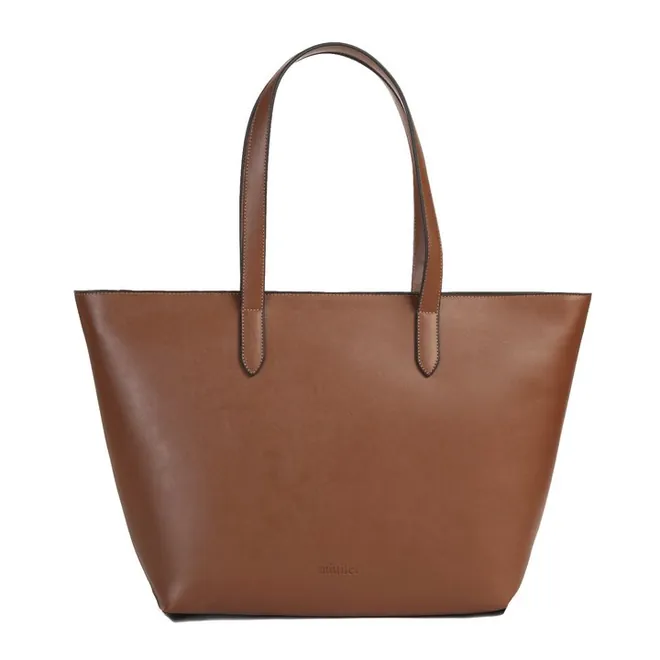
Everyday Tote
Everyday ToteST-01 · 349 RON
THE SAME DATA ACROSS THE ECOSYSTEM

The campaign’s product stays recognisable from the catalogue to the email.

You start from the connected product and its details.

1 / 3 · Product
Email & SMSYour store’s content, in the emailDemo data

The campaign’s productEveryday ToteST-01 · 349 RONEveryday Tote, brown bag
Creative StudioProduct creativeSTUDIO · Everyday ToteSTUDIO creative with the same Everyday Tote bag
Store · ReviewsAlexandra M.“I wear it every day.”
STUDIO · Autumn collectionDraft
Dynamic Content
STUDIOAUTUMN EDITION
PICKED FOR EVERY DAY

Good things stay.

Everyday Tote349 RONDiscover the collection
Prices

Prices tailored to the number of contacts and the volume of communication.

Choose the Email & SMS Marketing plan based on the size of your audience and your communication needs.

01
Email & SMS
Create and automate email and SMS marketing campaigns using product performance data.
Configure your plan

How many contacts do you have in the database?

  • 0–1.000
  • 1.001–2.500
  • 2.501–5.000
  • 5.001–10.000
  • 10.001–15.000
  • 15.001–20.000
  • 20.001–25.000
  • 25.001–30.000
  • 30.001–40.000
  • 40.001–50.000
  • 50.001–60.000
  • 60.001–70.000
  • 70.001–80.000
  • 80.001–90.000
  • 90.001–100.000
  • 100.001–120.000
  • 120.001–140.000
  • 140.001–150.000
  • Over 150,000

How many SMS will you send?

  • I don’t send SMS
  • Up to 270 SMS
  • Up to 1,428 SMS
  • Up to 2,941 SMS
  • Up to 32,258 SMS
  • Up to 86,206 SMS
  • Over 86,206 SMS
The total for your plan
Excluding VAT
Monthly€0
SMS, prepaid€0

Price details

No features selected

All prices are in EUR, excluding VAT. VAT at 21% is added to the total.

They say you need everything from A to Z. We’ve made it to Y. The rest is up to you.

Start where you are. Go as far as you want. Fill in the form and boost your performance: